Payrix Pro offers two ways to add payment acceptance to your website. You can integrate the following hosted payment options directly with an online platform or website checkout page:
PayFrame: An all-in-one hosted payment form that merchants can embed with minimal development effort.
PayFields: A highly customizable, iframe-based hosted payment solution that helps merchants to embed individual payment fields directly into their website or checkout page.
PayFrame and PayFields both support secured payment processing and simplified PCI compliance. The following sections describe each hosted payment option in more detail.
PayFrame
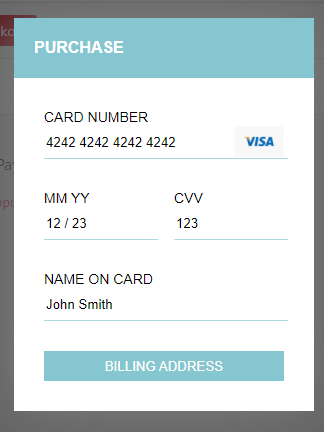
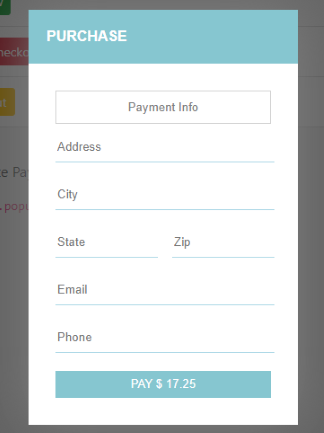
PayFrame embeds a Payrix Pro platform-hosted payment form on a merchant’s checkout page with basic customizations and minimal development effort. PayFrame integrates a secure payment form, enhancing customer experience and ensuring PCI-compliant transaction processing. With customizable JavaScript and callback functions, PayFrame allows easy adjustments to the form’s appearance and functionality.
To get started with your PayFrame integration, see the PayFrame integration guide on the Worldpay Developer Hub.
Key features of PayFrame include:
Quick integration: Minimal setup required; ideal for fast deployment.
Basic customization: Apply basic branding elements like logo, color, and description.
All-in-one form: Embed the entire payment form as a single unit.
Tokenization modes: Support token-only, transaction-only, or both transaction modes.
Digital wallets: Support Apple Pay and Google Pay payments.
The following images are examples of an integrated PayFrame payment form:
PayFields
PayFields is a highly customizable, Payrix Pro-hosted payment solution enabling your merchants to accept PCI-compliant payments directly on their website or checkout page. By embedding secure JavaScript iFrames, PayFields provides a prebuilt user interface for individual secure payment fields, supports custom CSS for flexible styling, and eliminates the need for direct API integration.
To get started with your PayFields integration, see the PayFields integration guide on the Worldpay Developer Hub.
Key features of PayFields include:
Standalone fields: Embed single payment fields like card number and expiration individually.
Custom styling: Maintain full control over the look and feel using custom CSS.
Tokenization support: Support token-only, transaction-only, or both.
Flexible payment methods: Accept card payments, eCheck payments, and digital wallet payments from Apple Pay and Google Pay.
Web Content Accessibility Guidelines (WCAG) compliance: Integrate compliant
<label>elements to support accessibility.Single-page application (SPA) compatibility: Support SPA workflows for applications built on React, Angular, and Vue.
Advanced configurations:
Optional fields: Add or remove fields like phone, email address, billing address, and address verification service (AVS) settings.
Prepopulated fields: Prefill fields that can be edited as needed.
Accept unencrypted card reader payments: Connect to compliant non-triPOS terminals for card-present transaction environments.
Process invoice payments: Connect an active invoice to a customer payment to apply a full or partial payment to the invoice created on the Payrix Pro platform.
Create new customer accounts: Create a new customer from a new PayFields transaction.
The following image is an example of a full checkout page integrated with PayFields:
.jpg)