Transaction funding refers to the process of settling captured merchant transaction funds from card and eCheck payments to be deposited in the merchant’s Payrix Pro account balance (also known as available balance). These funds are then available for withdrawal to the merchant’s bank account on file.
To know when a merchant receives transaction funds in their bank account after a payment takes place, you need to understand the following processes:
Transaction processing: See Payment Processing Life Cycle and Timelines for details about the transaction processing cycle for card and eCheck payments.
Settlement and disbursement processing: This article explains the funding flows for card and eCheck payment transactions, starting from settlement to withdrawal (also known as a payout) and disbursement. Transaction settlement and withdrawals each have their own cutoff time, which can significantly influence the timing of your deposits. To avoid any deposit disruptions or reconciliation discrepancies, adhere to the cutoff times described in the Transaction Settlement Batch Cutoff and Daily Scheduled Withdrawal Cutoff sections.
The following diagram depicts a standard funding and payout flow:
The following sections provide more information on settlement and disbursement, the general timelines for card and eCheck payments, and an example of funding a card payment with refunds.
Transaction Funds Settlement
Funding involves settling captured transaction funds to be sent to the merchant. Payrix Pro submits transaction settlement batches daily to the processor for both credit cards and ACH transactions. Each batch is composed of all sales and refund activity that has been captured for processor settlement within the daily period.
Processed and settled funds are first deposited to the merchant’s available balance. Merchants can access the Payrix Pro Portal to view the funded amount in their available balance. The merchant’s available balance is generally funded:
The next business day after card payment transactions are settled.
Within three to five business days after eCheck payment transactions are settled.
When the merchant’s available balance is funded from settled transaction amounts, the funds are immediately made available for withdrawal manually or automatically using the recommended 100% daily withdrawal schedule.
Note
Transactions can be flagged as high-risk by the processor, resulting in a several-day hold that delays the transaction from being funded and available for withdrawal. For questions regarding a transaction on hold or what constitutes a high-risk transaction, you can submit a Partner Services ticket or Risk Team ticket.
Transaction Settlement Batch Cutoff
The cutoff time for including a transaction in the day’s batch varies based on how the transaction is processed. Transactions processed before the batch cutoff time are typically funded the following day. Transactions processed after the batch cutoff time are typically captured in the next day’s batch, changing the date of the transaction settlement and subsequent funding.
The Payrix Pro platform offers a Custom Batch Time feature for you to customize the transaction settlement batch closure time. You can set up custom batch times to accommodate different time zones or set up a midnight-to-midnight batch schedule, improving merchant reconciliation with funded transactions by business day.
Funding Timeline Descriptions
Funding timelines are described using one of the following options:
T+1: Funding is deposited one business day after day T.
T+2: Funding is deposited two business days after day T. If the batch closes after the processor’s settlement cutoff time, the transaction rolls into the next funding cycle (T+2).
T+3: Funding is deposited three business days after day T. This occurs when a batch misses the processor’s settlement cutoff time, and the merchant uses a Standard Funding schedule and is not approved for Next Day Funding. If the batch closes after the settlement cutoff time, the transaction is included in the next day’s settlement file (T+3).
For example, if a transaction occurs on a Monday, T+1 funding occurs on Tuesday, T+2 funding occurs on Wednesday, and T+3 funding occurs on Thursday.
Notes
Weekends or holidays can delay the deposit date.
Settlement inclusion is determined by the batch close time, not the individual transaction timestamp.
Bank posting schedules may impact when funds appear available in the merchant account, even for T+1 funding timelines.
Funding program eligibility is merchant-specific and subject to underwriting approval.
triPOS and Express Batch Processing
triPOS and Express batch timing is based on whether the batch closes before or after the 9:00 PM ET cutoff:
Batch Close Timing | Settlement Type | Funding Timeline |
|---|---|---|
Before 9:00 PM ET | Same-day | T+2 (Standard Funding) |
Before 9:00 PM ET with Next Day Funding approval | Same-day | T+1 |
After 9:00 PM ET | Next-day | T+3 (Standard Funding) |
After 9:00 PM ET with Next Day Funding approval | Next-day | T+2 |
Payrix Gateway Batch Processing
The Payrix Gateway handles non-triPOS related transactions, including eCheck (ACH), Card Not Present transactions through the Payrix Gateway, Card Present transactions through the Payrix Gateway, tokenized transactions, and recurring billing. There are two default automated batch cycles for the Payrix Gateway: 7:30 PM ET and 9:30 PM ET.
Payrix Gateway batch timing is based on whether the batch closes before or after the 9:30 PM ET cutoff:
Batch Close Timing | Settlement Type | Funding Timeline |
|---|---|---|
Before 9:30 PM ET | Same-day | T+2 (Standard Funding) |
Before 9:30 PM ET with Next Day Funding approval | Same-day | T+1 |
After 9:30 PM ET | Next-day | T+3 (Standard Funding) |
After 9:30 PM ET with Next Day Funding approval | Next-day | T+2 |
Worldpay Direct Integrations Batch Processing
Worldpay Direct Integrations handles direct integrations, such as PAX terminals or Authorize.net, Cybersource, and Datacap integrations. The processor batch cutoff time for Worldpay Direct Integrations is 10:00 PM ET.
Worldpay Direct Integrations batch timing is based on whether the batch closes before or after the 10:00 PM ET cutoff:
Batch Close Timing | Settlement Type | Funding Timeline |
|---|---|---|
Before 10:00 PM ET | Same-day | T+2 (Standard Funding) |
Before 10:00 PM ET with Next Day Funding approval | Same-day | T+1 |
After 10:00 PM ET | Next-day | T+3 (Standard Funding) |
After 10:00 PM ET with Next Day Funding approval | Next-day | T+2 |
Batch Cutoff Best Practices
Refer to the below best practices for batch cutoff times based on business type.
For retail businesses that close before 9 PM ET:
Maintain a 9 PM ET batch closure time.
Prioritize T+1 funding timelines.
Merchants whose operational day extends past 9:00 PM ET, such as bars or other hospitality businesses, can set up custom batch times to keep reporting aligned to their business hours. However, this results in missing the processor cutoff time and pushes those transactions into the next settlement cycle, often resulting in T+2 funding. For late-night businesses that close after 2 AM ET:
Set batches to close between 2 to 3 AM ET.
Accept consistent T+2 funding timelines.
Clean up reconciliation and single operational day reporting.
Fee Deductions
Two types of merchant billing structures are available for fee collection: net billing and statement billing. Each process deducts fees from transaction funds in different ways.
In a net billing structure, the assessed fees are deducted from each transaction in the batch before funding of the merchant’s available balance occurs.
In a statement billing structure, the assessed fees for all transaction amounts for a set period (usually monthly), are recorded as individual entries and deducted from the merchant’s available balance or operating bank account as a single total.
Note
If a merchant is also assessed any form of a payout fee, this will be applied during the withdrawal stage and be collected.
Payouts and Disbursements
How and when your merchants receive their processing income is integral to setting your merchants’ expectations and ensuring they’re receiving their processing income as quickly as possible.
After a merchant’s daily transaction batch is settled and the funds appear in their Payrix Pro available balance, they can disburse the funds from their Payrix Pro balance to their bank account using the withdrawal function. When a transaction is funded to a merchant’s available balance and a withdrawal is created, the data is recorded and available for record-keeping, reconciliation, and data tracking purposes as a Disbursement Summary report.
Note
In the portal, payouts are shown under Withdrawal Schedules, and completed disbursement events are represented under Withdrawal History.
Withdrawal Schedules
Your merchants must have an active withdrawal schedule to receive payouts to their bank account. Otherwise, any processing income remains in their Payrix Pro available balance and are not sent to their bank account.
You can customize your merchants’ withdrawal schedule based on their business needs and their settled transaction activity. For example, you can configure the merchant’s withdrawal schedule as a one-time, daily, weekly, biweekly, or monthly disbursement to their bank account depending on their preferred timeline. Additionally, you can specify a dollar amount or percentage of a merchant’s available balance to disburse. See Set Up a Withdrawal Flow for New Merchant Accounts for instructions on creating a withdrawal schedule for multiple merchants under your portfolio.
The most common setup for merchants is to have a 100% daily withdrawal schedule, which Payrix Pro can also automate as part of a workflow. This ensures that all your clients have a standard withdrawal schedule created when they are onboarded. As a partner, you also need to create a withdrawal schedule to receive the funds for fees you collected from your merchants.
Important!
At a maximum, merchants can receive one disbursement to their bank account each business day.
Depending on your platform’s agreement with the Payrix Pro Underwriting team, merchants that are newly added to Payrix Pro might be subject to an initial funding delay of three to seven business days. During this period, all scheduled withdrawals remain pending for additional review. Any payout requested during this time frame will be sent all at once after the initial delay period passes.
Daily Scheduled Withdrawal Cutoff
The cutoff time for completing a scheduled withdrawal or payout of funds in the account balance is 6:00 PM ET.
Scheduled withdrawals of a merchant’s available balance are processed before the daily cutoff and are typically deposited by ACH the following day. Any withdrawal scheduled after this cutoff time results in a one-day delay in the depositing of withdrawn funds to the merchant’s bank account.
Important!
Withdrawals are not processed on US holidays and weekends. Withdrawals that are requested over the weekend remain in Processing status and update to Processed on the next business day. See Withdrawal Schedule for more details.
Holidays include:
New Year's Day: January 1
Martin Luther King Jr. Day: Third Monday of January
President’s Day: Third Monday of February
Memorial Day: Last Monday of May
Independence Day: July 4
Labor Day: First Monday of September
Columbus Day: Second Monday of October
Veterans Day: November 11
Thanksgiving Day: Fourth Thursday of November
Christmas Day: December 25
Payout Processing Timelines
To facilitate faster funding for your merchants, we offer two payout or disbursement options. The following sections describe each option. We recommend you discuss both options with your Partner Experience Manager to get an understanding of funding considerations and the costs associated with each option.
Note
Regardless of the payout method, a disbursement is still dependent on the processing time frame of the merchant’s bank. Specific bank account deposit timing might vary if the merchant’s bank experiences delays in releasing funds, impacting when the funds actually reach the merchant’s bank account.
Standard Disbursement Timeline
Funds are sent to your bank account at 6 PM ET on the day following your batch settlement. For example, if you schedule a withdrawal for Tuesday, the withdrawal will include your processing income for transactions submitted up until batch close on Monday evening at 9:30 PM ET.
When a disbursement is sent to your bank account at 6 PM ET, the funds become available to you the next morning, although the timing can vary depending on your bank. As an example, when a payout triggers at 6 PM ET on Tuesday evening, the money reaches your bank account no earlier than Wednesday morning and might take longer to process depending on the bank.
When the payout triggers, a Disbursement Details report is generated, listing all of the transaction activity included in that payout.
Note
Depending on the size of the report, this data might take a while to populate once requested and then processed. Processing time varies and is based on how many entries are in the disbursement.
The following diagram depicts the standard disbursement flow:
Same-Day Disbursement Timeline
The same-day payout solution triggers the disbursement process at 10:30 AM ET on the morning after the merchant’s transaction batch closes. In general with same-day payouts, the money reaches the merchant’s bank account on the same afternoon that the disbursement was sent. For example, when the merchant’s transaction batch closes on Monday evening at 9:30 PM ET, their payout is triggered the next morning (Tuesday) at 10:30 AM ET, and the funds are deposited in their bank account later that afternoon.
Important!
Access to same-day payouts requires prior Payrix Pro Underwriting approval.
Same-day payouts have a daily limit of $100,000.00 per merchant account (MID). Any amount that exceeds this threshold goes into the standard payout schedule and is sent to the merchant’s bank at 6:00 PM ET.
The following diagram depicts the same-day disbursement flow:
Negative Disbursements
A negative disbursement, also called debit, refers to funds that are debited from a merchant’s available balance. A negative disbursement is in contrast to a positive disbursement, where funds are credited to the merchant’s available balance. The available balance is the sum of all the entries on a merchant’s account.
Negative Disbursement Process
Negative disbursements can be triggered based on the merchant’s available balance for a number of reasons, such as the following:
Profit shares and fees
Refund processing
Incoming chargebacks
Reserve balances
Unique risk setups
This process is designed to process a disbursement from the merchant’s listed bank account to bring their available balance from a negative amount back to $0.00. If any pending entries are active when a debit is triggered, the amount debited will be reduced by an equal amount.
You can learn more about a merchant’s available balance using the Merchant Balance Details page. You can also find details regarding each negative disbursement using the Balance Details report.
Negative Disbursement Parameters
The Payrix Pro Risk team can define specific parameters that dictate the amount an account can be negative, and when a debit will be triggered to cover the balance. The following sections describe each parameter.
Parameter | What the parameter determines | Notes |
|---|---|---|
Debit Grace Period | The number of days before a merchant will be debited to cover their negative balance | This allows a merchant to process more transactions or resolve other outstanding balances to become positive. The Payrix Pro Risk team sets an appropriate grace period based on the merchant’s unique business model. |
Negative Balance Limit | The maximum amount by which a merchant’s available balance can be negative before a debit is automatically triggered | Similar to the Debit Grace Period parameter, the Payrix Pro Risk team sets a reasonable amount for the Negative Balance Limit parameter based on the merchant’s risk profile. |
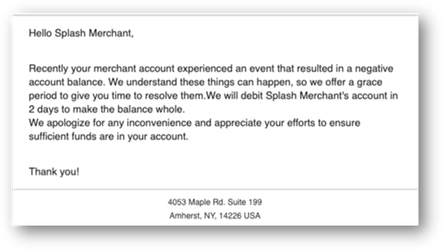
Negative Balance Email | Whether an email is sent to the merchant notifying them of:
| This parameter can be modified on the Email Alerts page. See the image of a sample email notification that follows this table. |
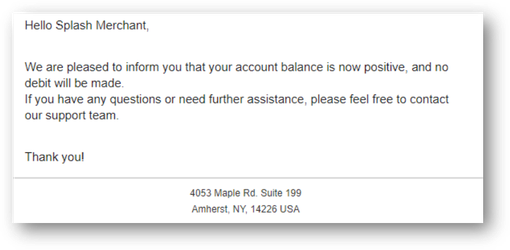
Positive Balance Email | Whether an email is sent to the merchant notifying them that:
| This parameter can be modified on the Email Alerts page. See the image of a sample email notification that follows this table. |
The following image shows an example of an email notification triggered by the Negative Balance Email parameter:
The following image shows an example of an email notification triggered by the Positive Balance Email parameter:
Payout Descriptors
You can customize the payout descriptor that’s displayed on merchant bank statements to help merchants identify disbursements from the Payrix Pro platform. For example, merchants who operate multiple locations might want to distinguish the disbursements for each location.
The following sections provide examples of default payout descriptors and customizable secondary descriptors.
Default Descriptors
Default descriptors look like the following:
MerchPayout SV9T 8447752748 XXXXXX {Merchant Name}
MerchPayout SV93 8447752748 XXXXXX {Merchant Name}
Secondary Descriptors
A secondary descriptor appears after the default descriptor and before the merchant name. The secondary descriptor is limited to 15 characters, and the display of each descriptor can vary slightly for each issuing bank.
You can use secondary descriptors for individual merchants, Groups, or through payout schedules. Secondary descriptors are limited to the Vantiv (VAP) platform.
After adding a secondary descriptor, your merchants see your custom descriptor on their bank statements and online banking transaction details. A secondary descriptor looks like the following:
Merchant example: MerchPayout SV9T 8447752748 201211 LOC-DENVER EXAMPLE MERCHANT 1
Group example: MerchPayout SV9T 8447752748 201211 REGION-WEST EXAMPLE MERCHANT 2
Payout schedule example: MerchPayout SV9T 8447752748 201211 PAYOUT-071525 EXAMPLE MERCHANT 3
Discrepancies in Disbursement Amounts
When dealing with withdrawal disbursements in the portal, potential discrepancies might arise between expected and actual disbursement amounts. These variations can be attributed to several factors within the system:
Available balance constraints: If the available balance is less than a cent ($0.01), it might result in a discrepancy in the disbursement amount.
Risk parameters: Risk parameters set by you or your parent entity might prevent the full disbursement amount from being processed, contributing to differences in expected and actual amounts.
Withdrawal schedule considerations: Both withdrawal schedule types (Percentage and Actual), as well as Float parameter settings below 100%, can affect the disbursement amount.
Negative entry events: Events like chargebacks, authorizations, and payout fees occurring between the disbursement request and processing can lead to discrepancies.
Not disbursed: Certain interchange fees that amount to less than a full cent ($0.01) are displayed under Not Disbursed in a Disbursement Summary as an undisbursed amount rollover.
Refund status changes: Changes in refund status during disbursement processing might impact the final disbursed amount.
Transaction Funding Timelines
The following sections explain the overall transaction funding timeline—from batch settlement to funding of the account balance and then the merchant’s bank account—for card payments and eCheck payments. Because we offer a variety of custom withdrawal options, these timelines might vary depending on the merchant’s account configuration.
Note
All timelines in the following sections depict a 100% daily withdrawal schedule for merchants with a standard disbursement configuration. In other words, these timelines are based on an automatic daily disbursement of all funds in the account balance to a merchant’s bank account.
Card Transaction Funding Timeline
Card payment transaction funds are funded to the merchant’s account balance the day after the transaction is processed.
If the merchant is using a 100% daily withdrawal schedule, transaction funds in the account balance are typically deposited by ACH to the merchant’s bank account:
Later that same evening for same-day disbursements.
The next business morning for standard disbursements.
In other words, the funds are in the merchant’s bank account between one to two business days from when the payment is approved.
The following table and diagram depict the card payment funding timeline for merchants with a standard disbursement configuration:
Transaction Batch Close | Account Balance Funded | Bank Account Deposit |
|---|---|---|
Monday | Tuesday | Wednesday morning |
Tuesday | Wednesday | Thursday morning |
Wednesday | Thursday | Friday morning |
Thursday | Friday | Monday morning |
Friday | Monday | Tuesday morning |
Saturday | Monday | Tuesday morning |
Sunday | Monday | Tuesday morning |
eCheck Transaction Funding Timeline
Depending on the payer’s bank, eCheck payment transactions are funded to the merchant’s account balance three to five business days after the transaction is processed.
If a merchant is using a 100% daily withdrawal schedule, the funds from their account balance will be in their bank account:
Later that same evening for same-day disbursements.
The next business morning for standard disbursements.
In other words, the funds reach the merchant’s bank account five to seven business days from when an eCheck transaction is processed.
The following table and diagram depict the typical eCheck payment funding timeline for merchants with a standard disbursement configuration. This timeline is based on the earliest possible funding time for the account balance, which is three business days:
Transaction Batch Close | Account Balance Funded | Bank Account Deposit |
|---|---|---|
Monday | Thursday | Friday morning |
Tuesday | Friday | Monday morning |
Wednesday | Monday | Tuesday morning |
Thursday | Tuesday | Wednesday morning |
Friday | Wednesday | Thursday morning |
Saturday | Wednesday | Thursday morning |
Sunday | Wednesday | Thursday morning |
Example of Card Payment Funding with Refunds
This section demonstrates an average merchant's settlement and payout flow when customer transaction refunds are issued during daily operations. This example shows what a merchant can expect for the timeframe to process and handle refunds.
Note
The platform is configured to use a merchant’s available balance to handle transaction refunds and lost chargeback dispute amounts.
The following is an example scenario of refund amounts debited from the account balance:
Day 1: A merchant has an available balance of $500.00 from previously settled funds, ready to be disbursed to their bank account.
Day 2: The merchant generates $300 in credit card transactions, but also issues a transaction refund of $100.00 to resolve a customer issue.
The refund amounts are immediately debited from the account balance instead of the merchant’s bank account.
The final amount in the account balance to be disbursed to the merchant’s bank account is $400.00.
Day 3: Because the refund amount will not be deducted from the previous day’s sales settlement batch calculation ($300 in sales and $100 in refunds), the merchant’s settled amount for the previous day’s transactions is $300.
The following diagram depicts the funding flow example with refunds: